 ThumbGlance
FACEBOOK COVER PHOTO
Facebook cover photo size.
Facebook recommends 851 × 315 pixels for a Page cover, with a minimum of 400 × 150 pixels. Desktop shows a 16:9 frame; mobile shows 2.4:1, and the Page avatar covers about 40 px of it.
The recommendation is an sRGB JPG under 100 KB for fastest loading. Facebook also says PNG can look better for a cover with a logo or text. The upload is wider than either display frame, so each frame keeps a different slice of the same file.
Not stated on the official page: safe-area values, a maximum cover file size, and a separate size for a personal-profile cover. This is an independent tool, not affiliated with Facebook.
The official numbers, kept on their own surfaces
Facebook’s Page cover help page answers the upload question and the display question separately. The table keeps those answers in their own rows and writes “Not stated” where the page read published no value.
| Placement or rule | Published value | Value type | Official page | Read (UTC) |
|---|---|---|---|---|
| Cover upload recommendation | 851 × 315 px, sRGB JPG, less than 100 KB | Recommendation for fastest loading | Page cover photo | 2026-11-04 |
| Cover minimum | 400 px wide × 150 px high | Published minimum | Page cover photo | 2026-11-04 |
| Desktop cover frame | 16:9, left-aligned, full width | Display frame | Page cover photo | 2026-11-04 |
| Mobile cover frame | 2.4:1, left-aligned, full width | Display frame | Page cover photo | 2026-11-04 |
| Mobile avatar overlap | About 40 px | Approximate overlap depth | Page cover photo | 2026-11-04 |
| Page avatar display size | 176 × 176 px on a computer; 196 × 196 px on a phone; 36 × 36 px on a feature phone; circular crop | Display sizes | Page cover photo | 2026-11-04 |
| Page avatar quality | 320 × 320 px | Recommendation for best quality | Page cover photo | 2026-11-04 |
| Cover with a logo or text | PNG can look better | Design suggestion | Page cover photo | 2026-11-04 |
| Cover safe-area values | Not stated | No safe-area rectangle on the page read | Page cover photo | 2026-11-04 |
| Cover maximum file size | Not stated | Only the under-100 KB recommendation appears | Page cover photo | 2026-11-04 |
| Personal-profile cover | Not stated | The page read covers Page covers | Page cover photo | 2026-11-04 |
Keep the rows apart. The 851 × 315 recommendation, the 400 × 150 minimum, the two display frames and the ≈40 px avatar overlap are published for a Page cover. The 176, 196, 36 and 320 px avatar values describe the Page avatar, not the cover. The page read publishes no safe-area rectangle, no maximum cover file size and no personal-profile cover size.
The under-100 KB line is part of the fastest-loading recommendation. It is not stated as a hard upload ceiling, and Facebook does not define “100 KB” in bytes on the page read. This page’s tool therefore compares each export with 100,000 bytes as its own decimal target and labels that comparison as a local check.
One 851 × 315 file, two different crops
The recommendation is a wide file: 851 ÷ 315 ≈ 2.70:1. The desktop frame is 16:9 (≈ 1.78:1) and the mobile frame is 2.4:1. A cover crop fills the frame, so the taller desktop frame keeps less of the upload’s width than the mobile frame does.
At the recommendation’s 315 px height, the frame widths are fixed by the two published ratios. This model anchors both windows at the left edge; the official page calls the cover left-aligned and does not publish the exact crop rectangle.
Desktop width = 315 × 16 ÷ 9 = 560 px · Mobile width = 315 × 2.4 = 756 px
Kept shares of 851 px = 560 ÷ 851 = 65.80% · 756 ÷ 851 = 88.84%
- Desktop 16:9
- 560 of 851 px 65.80% kept · 34.20% removed
- Mobile 2.4:1
- 756 of 851 px 88.84% kept · 11.16% removed
- Avatar overlap
- ≈ 40 px Lower-left depth · exact shape Not stated
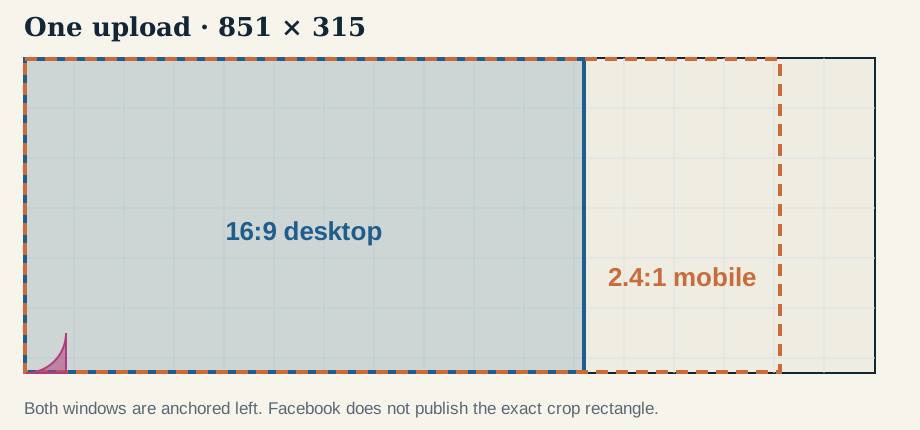
| Frame | Frame at 315 px high | Kept source width | Kept share | Removed share |
|---|---|---|---|---|
| Desktop · 16:9 | 560 × 315 px | 560 px, x 0–559 | 560 ÷ 851 = 65.80% | 291 px wide · 34.20% |
| Mobile · 2.4:1 | 756 × 315 px | 756 px, x 0–755 | 756 ÷ 851 = 88.84% | 95 px wide · 11.16% |
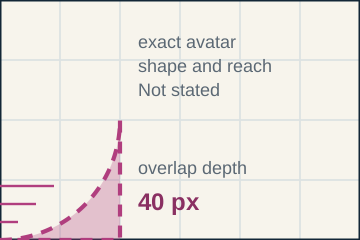
The ≈40 px avatar overlap sits at the lower-left of the mobile cover. Facebook publishes the overlap depth, not the avatar’s full diameter or its horizontal reach. The tool marks a 40 × 40 px quarter disc as an illustration of that depth; it does not claim the exact Facebook shape.
“Left-aligned” does not fix every pixel of the crop. The official page does not publish the crop rectangle, so the tool below defaults to the left edge and lets you move the crop horizontally. If you move it, the kept width stays the same and the window slides across the upload.
Crop one cover for both frames
Choose a static PNG or JPG. Both files encode from the same source with the same crop position: 560 × 315 for the 16:9 desktop frame and 756 × 315 for the 2.4:1 mobile frame. The mobile preview can show the published ≈40 px avatar overlap; that mark is not added to the downloaded file.
Desktop frame · 560 × 315
851 px reference: keeps 65.80%
Choose an image to begin.
No image loaded.
- Choose a static PNG or JPG to read back the encoded file.
Mobile frame · 756 × 315
851 px reference: keeps 88.84%
Choose an image to begin.
Dashed quarter disc = the published ≈40 px overlap depth. It is a preview mark, not part of the file. Exact avatar diameter and reach: Not stated.
No image loaded.
- Choose a static PNG or JPG to read back the encoded file.
Official source: Facebook Page cover photo help — read 2026-11-04 (UTC). The 560 × 315 and 756 × 315 canvases, the 65.80% and 88.84% shares, and the 100,000-byte comparison are this site’s calculations. A local pass does not prove Facebook will accept the file or keep the composition uncropped.
What the measured two-frame test shows
We made one deterministic 851 × 315 source in code: a 50 px grid, three 64 × 64 px corner markers at x = 24, 560 and 763, and a 36 × 36 px marker at the lower-left. The generator crops that same source four ways — desktop and mobile at the left and right crop positions — writes four PNGs, checks every decoded row, and makes a 320 px-wide preview of each. The source, exports, previews, hashes and rows are in facebook-cover-samples/results.json. Run make_samples.py with Python 3 to rebuild the set; it uses only the standard library and has no clock, randomness or network access.
The browser uses its own resampler, so the byte counts below describe the PNG files generated here, not a browser download. After writing each PNG, the generator reopens the file, checks the signature and every chunk CRC, decompresses the image data and compares every decoded row with the generated canvas.
What each crop keeps and removes
The geometry is the same Fill rule the browser uses: scale = max(W / 851, H / 315), a kept source rectangle of (W / scale) × (H / scale), and a horizontal start of (851 − kept width) × focus. At 315 px high the scale is 1, so the exports are direct pixel slices.
Desktop removed = 851 × 315 − 560 × 315 = 91,665 px² · 34.20%
Mobile removed = 851 × 315 − 756 × 315 = 29,925 px² · 11.16%
| Frame | Crop | Kept source region | Removed | PNG bytes | Visible markers: TL / A / B | Lower-left marker px |
|---|---|---|---|---|---|---|
| Desktop 560 × 315 | Left, focus 0% | 560 × 315 at x = 0 | 91,665 px² · 34.20% | 4,157 | 4,096 / 0 / 0 | 1,296 |
| Desktop 560 × 315 | Right, focus 100% | 560 × 315 at x = 291 | 91,665 px² · 34.20% | 4,226 | 0 / 4,096 / 4,096 | 0 · cropped out |
| Mobile 756 × 315 | Left, focus 0% | 756 × 315 at x = 0 | 29,925 px² · 11.16% | 5,386 | 4,096 / 4,096 / 0 | 1,296 |
| Mobile 756 × 315 | Right, focus 100% | 756 × 315 at x = 95 | 29,925 px² · 11.16% | 5,495 | 0 / 4,096 / 4,096 | 0 · cropped out |
Marker A starts at x = 560, so the left-anchored desktop window ends just before it and the left-anchored mobile window keeps it. Marker B starts at x = 763, beyond both left-anchored windows. At the right anchor the windows move past the top-left marker and include both right-hand markers. The marker counts are measured pixels from the exported files, not estimates.
What the 40 px avatar overlap covers
The avatar mask is a quarter disc of radius 40 px at the lower-left corner of the 756 × 315 mobile canvas. Its box is 40 × 40 = 1,600 px²; the quarter disc covers 1,256 whole-pixel centres (continuous area π × 40² ÷ 4 = 1,256.64 px²). In the left-anchored mobile export, that mask covers 1,074 of the 1,296 lower-left marker pixels — 82.87% of the marker. The other 222 px sit outside radius 40, which is why the marker is a conservative stand-in for a round avatar.
The four encoded previews
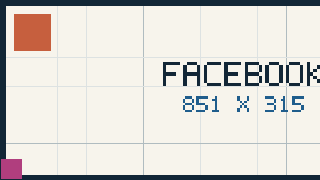
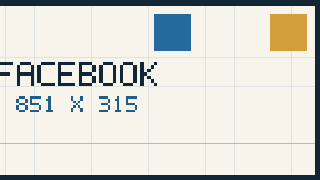
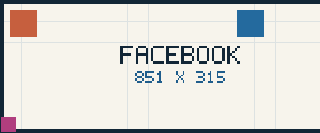
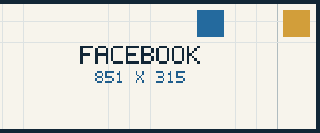
Two negative controls show that the checks can fail. wrong-desktop-559x315.png is one pixel short of 560 × 315. shifted-mobile-756.png has the right canvas size but samples the source 16 px to the right, so it differs from the left-anchored 756 × 315 export. Both are in facebook-cover-samples/negative/.
Limits of this test
This is a controlled local geometry and file test. It uses one synthetic source, PNG only and nearest-neighbour sampling. It does not upload to Facebook, use a logged-in Page, measure Facebook’s own crop, resize or compression, or test JPG. The byte counts depend on this grid image and encoder; another image produces different bytes at the same pixels. The 40 px overlap mark is a depth illustration, not a measured Facebook avatar shape.
The upload check, frame by frame
The order matters: start with the surface, then the file, then the two frames, then the overlap.
- Name the surface. A Page cover and a personal-profile cover are different questions. This page covers the Page values; the personal-profile cover size is Not stated on the page read.
- Start from the recommendation. 851 × 315 px sRGB JPG under 100 KB for fastest loading; the minimum is 400 × 150 px. A PNG can look better for a cover with a logo or text, but it will usually be larger.
- Check both frames, not one. At 315 px high the desktop 16:9 frame keeps 560 of the 851 px width (65.80%); the mobile 2.4:1 frame keeps 756 px (88.84%). A subject that is fine on desktop can still be cut on mobile, and the other way round.
- Keep the subject away from the lower-left 40 px. Facebook says the mobile avatar covers about 40 px of the cover’s left side. Put the logo or face outside that corner zone; the exact avatar size and reach are Not stated.
- Do not treat 851 × 315 as 16:9. It is 2.70:1. The 16:9 and 2.4:1 values are display frames, and the page read publishes no crop rectangle inside them.
- Read the encoded file. Check width, height, MIME type and bytes after export. This page’s 100,000-byte comparison is a decimal tool target; Facebook says under 100 KB without defining the byte count.
- Use the exported pair for a self-check. The desktop and mobile files show what each frame keeps from your own source. A local pass does not prove Facebook will accept the upload or preserve the composition.
Questions
What is the Facebook cover photo size?
Facebook recommends 851 × 315 px sRGB JPG under 100 KB for a Page cover, and gives a minimum of 400 × 150 px. The page also says a cover with a logo or text can look better as a PNG.
Is the Facebook cover 16:9?
The desktop display frame is 16:9 and the mobile display frame is 2.4:1. The 851 × 315 upload itself is 2.70:1, which is wider than both frames. The upload is a source file; the frames are how Facebook shows it.
Why does my Facebook cover get cut off on mobile?
On mobile, the cover fills a 2.4:1 frame at the published 40 px avatar overlap. Starting from 851 × 315 at the recommendation’s height, the mobile frame keeps 756 of the 851 px width (88.84%) and the desktop frame keeps 560 (65.80%). A left-anchored crop can lose the right edge; the avatar can cover the lower-left.
What is the Facebook cover photo file size?
The official page read gives no maximum cover file size. It recommends an sRGB JPG under 100 KB for fastest loading and does not define “100 KB” in bytes. This page’s tool compares each export with 100,000 bytes as its own target, not as a Facebook ceiling.
What size is a personal-profile cover?
Not stated on the Page cover help page read. This page does not move the Page values onto a personal profile. Use the Page values only for a Page cover.
Is there a Facebook cover safe area?
The page read publishes no safe-area values. It does say the cover is left-aligned, that the mobile avatar covers about 40 px, and that the cover may be cropped or scaled by the screen. This page marks the published depth and leaves the rest unclaimed.
Does this tool upload my image?
No. Decoding, cropping, encoding and file readback happen in this browser. The page has no image-upload endpoint and stores nothing after you close it.
Sources and evidence limits
- Facebook Help: Page cover photo — 851 × 315 px sRGB JPG under 100 KB for fastest loading, 400 × 150 px minimum, desktop 16:9, mobile 2.4:1, the ≈40 px mobile avatar overlap, Page avatar display values and the PNG suggestion. Read 2026-11-04 (UTC). Safe-area values, maximum cover size and personal-profile cover size are Not stated.
- facebook-cover-samples/results.json — source, four PNG exports, four previews, hashes and measured rows from
make_samples.py. Local geometry and file evidence; not a Facebook upload test. - The 560 × 315 and 756 × 315 canvases, the 65.80% and 88.84% shares, the 100,000-byte comparison and the 40 px quarter-disc mark are this site’s calculations from the published values.
Other image tools
Making a cover for another platform? Use the LinkedIn banner size tool, the Discord banner size tool or the Reddit banner size tool; their official dimensions and file rules differ.
Working on a video thumbnail instead? Return to the ThumbGlance preview tool.