 ThumbGlance
YouTube profile picture size.
Your YouTube channel profile picture renders at 98 × 98 px. The upload must be a JPG, GIF, BMP, or PNG file (no animated GIFs), and image size should not exceed 15 MB. YouTube does not publish upload pixel dimensions for profile pictures — 98 × 98 px is the render size, not a stated upload size. YouTube Help, checked .
If you searched for the youtube profile pic size, this is the same channel avatar specification: 98 × 98 px is the render size, not an upload minimum.
Preview the circle crop ↓Preview the YouTube profile pic size
Upload one image to inspect the YouTube avatar size in our round preview at 98 px, then in 2× (196 px) and 3× (294 px) enlarged inspection views. These are canvas sizes, not a simulation of your screen’s pixel density. The circular mask is our preview: the cited page states the 98 × 98 render size but does not describe a mask shape. Check the final result on your channel after uploading.
The corners outside the circle are the parts a round avatar hides. Upload an image to preview it.
Tool limits and what the previews change
Static JPG, PNG, WebP and GIF files only; animated GIFs are not supported. This tool uses the existing tools’ input limits: 25 MiB (26,214,400 bytes) and 40,000,000 decoded pixels. These are our limits, not YouTube requirements. Processing is local and requires no account.
The preview scales your image with a centered cover crop inside a circular mask. Scaling cannot recover detail that a small source does not contain, so a source under 294 px may look soft in the 3× preview.
YouTube profile picture size by surface
Checked September 19, 2026. Your YouTube channel profile picture size is the value YouTube states; the other surfaces show the same file at sizes the cited page does not publish. Format and size-limit columns repeat the official upload file constraints.
| Surface | Display size | Format | Size limit |
|---|---|---|---|
| Channel profile picture YouTube Help | “Image that renders at 98 X 98 px” (official wording). | JPG, GIF, BMP, or PNG file (no animated GIFs). | Image size should not exceed 15 MB. |
| Comments and replies YouTube Help | Not stated by YouTube. | Same upload file constraint: JPG, GIF, BMP, or PNG (no animated GIFs). | Same upload file constraint: 15 MB. |
| Subscriptions feed YouTube Help | Not stated by YouTube. | Same upload file constraint: JPG, GIF, BMP, or PNG (no animated GIFs). | Same upload file constraint: 15 MB. |
| Search results YouTube Help | Not stated by YouTube. | Same upload file constraint: JPG, GIF, BMP, or PNG (no animated GIFs). | Same upload file constraint: 15 MB. |
Download the profile picture CSV
The circular crop is how YouTube surfaces display the avatar, but the cited page does not state a mask shape; only the 98 × 98 render size is official wording. Values marked “not stated” must not be inferred from another surface.
YouTube logo size
Checked against YouTube Help: Manage your channel branding. The Help page does not publish a separate channel logo size. Its profile-picture guidelines state “Image that renders at 98 X 98 px” and “Image size should not exceed 15 MB.”
Banner artwork has separate specifications. At the 2048 × 1152 px minimum, the page gives a 1235 × 338 px safe area for text and logos; that is an area, not a single logo size. See the YouTube banner size guide.
For the small channel mark that appears in the corner of your videos, use the YouTube watermark maker.
Work out the dimensions
To pick YouTube profile picture dimensions for a square source, the following values are arithmetic derived from the official render size above; they are not new platform requirements.
Match the render size
The stated render size is 98 × 98 px. A square source maps one source pixel to one rendered pixel at 1×.
98 × 1 = 98 px
98 × 2 = 196 px
98 × 3 = 294 px
Compose inside the circle
A round mask hides the corners of a square canvas. Keep the subject inside a centered circle whose diameter equals the canvas side.
Canvas side = S
Visible circle diameter = S
This composition rule is our suggestion, not an official requirement.
Check sharpness headroom
For a source square of S × S, the sharpest possible circle is limited by S.
1× needs S ≥ 98 px
2× needs S ≥ 196 px
3× needs S ≥ 294 px
Stay inside the file limits
Export a static format and check the bytes after encoding.
Formats: JPG, GIF, BMP, PNG
Animated GIFs: excluded
Size limit: 15 MB (official label)
The official page states the 15 MB label; it does not state an exact byte threshold.
Circle safe area and a free template
A round avatar keeps 78.54% of a square image and hides the four corners, which are the other 21.46%. Anything with straight edges, such as text or a square logo, is only fully visible inside the largest square that fits in the circle. That square's side is the canvas side divided by √2, about 70.7% of the canvas.
| Square canvas | Visible circle | Safe square inside it | Margin on each side |
|---|---|---|---|
| 98 × 98 px | 98 px across | 69.3 × 69.3 px | 14.4 px |
| 294 × 294 px | 294 px across | 207.9 × 207.9 px | 43.1 px |
| 800 × 800 px (template) | 800 px across | 565.7 × 565.7 px | 117.2 px |
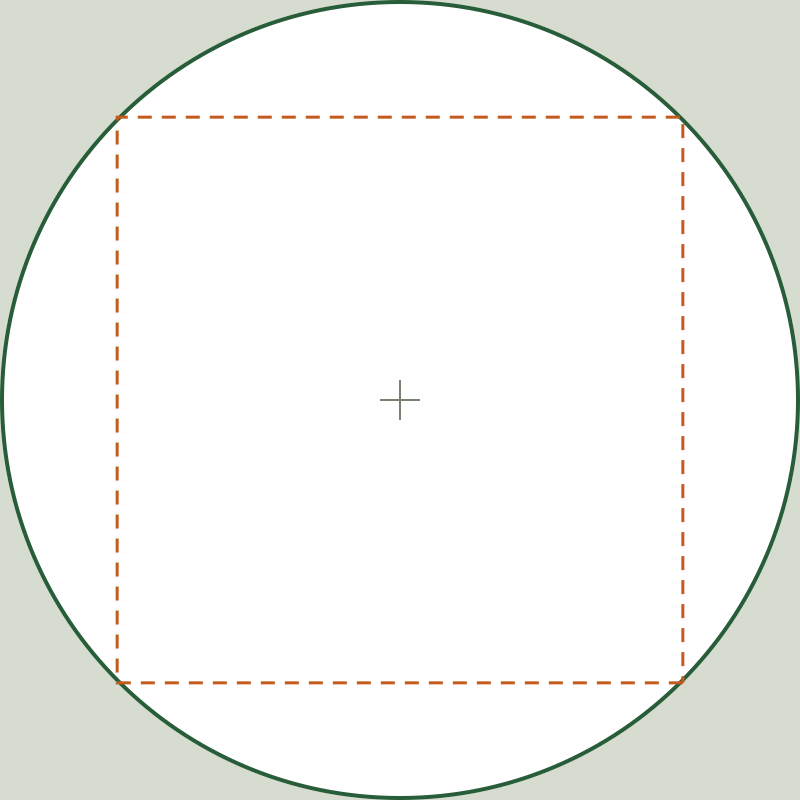
These YouTube profile photo size calculations are geometric, not measurements from a phone. YouTube does not publish how large the avatar appears on phones, so check the uploaded picture in the YouTube app as well as on a computer.
import math
for side, safe, margin in [(98, '69.3', '14.4'), (294, '207.9', '43.1'), (800, '565.7', '117.2')]:
    square = side / math.sqrt(2)            # largest square inside the circle
    assert f"{square:.1f}" == safe and f"{(side - square) / 2:.1f}" == margin
assert f"{math.pi / 4 * 100:.2f}" == '78.54'   # share of the canvas the circle keeps
print('Profile circle checks passed')
Upload with a final check
- Prepare a square image at 98 × 98 px or larger; 294 × 294 px covers 3× screens.
- Preview the circular crop above, confirm nothing important sits in the corners, and download the 98 × 98 PNG if you want a ready-to-upload circle.
- In YouTube Studio, open Customization → Profile, change the profile picture, and inspect how it renders on your channel. Official upload instructions.
Check your YouTube channel picture size on each surface after uploading: YouTube does not state per-surface display sizes.